PracticalMode
EN
EnglishEspañol
Let’s talk
HomeIndustriesLandscaping

Landscaping website design for design-build and lawn care companies

PracticalMode designs and rebuilds websites for landscapers. A homeowner planning a patio reaches your designer with photos and a budget range, and a maintenance customer can join the spring route from a phone.

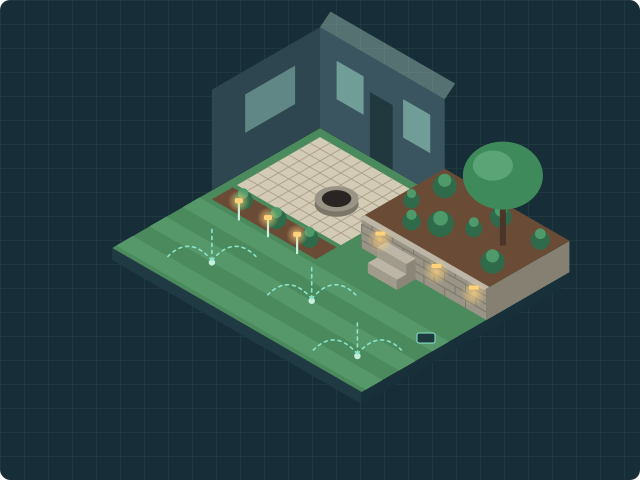
Original isometric drawing of a backyard with a paver patio and fire pit, a stone retaining wall with steps, planting beds, path and wall lights, and lawn irrigation heads.
One yard, five services a landscape website has to explain: patio, wall, lighting, irrigation and lawn care.

Interactive example · Fictional landscaper

What should your landscaping website promote this season?

A landscaping business sells different work in March and in November. Choose a season to see what the homepage of Quillmoss Landscape Co. would put first. The yard drawing changes with it.

Spring: fill the maintenance route

Headline
Spring cleanups and weekly mowing in Juniper Vale
Main button
Join the spring maintenance schedule
Second link
Book a landscape design consultation for summer

If your crews start mowing in April, put the plan, its start week and the towns on your route above the fold. Keep design-build work one tap away.

Summer: show finished projects

Headline
Patios, retaining walls and outdoor lighting built in Juniper Vale
Main button
Request a design-build estimate
Second link
See this month’s finished projects

In summer, neighbors often see your crews at work. Lead with recent project photos labeled with the town and material, and say how far ahead your installation calendar is booked.

Fall: cleanups now, designs for next year

Headline
Fall cleanups, leaf removal and next season’s design list
Main button
Book a fall cleanup
Second link
Reserve a winter design consultation

Cleanup requests are short jobs with a deadline. Show the last service week and the area you cover, then invite homeowners to plan next year’s patio while your designers have time.

Winter: snow removal and design-build bookings

Headline
Snow removal contracts and spring installation planning
Main button
Ask about snow removal
Second link
Plan a spring patio or wall project

If you are a landscaper who offers snow removal, say which properties and which storms you cover. If your designers book spring installations in February, keep the design-build estimate on the first screen too.

Quillmoss Landscape Co., Juniper Vale, Wrenfield and Copper Bend are fictional. Seasonal timing depends on your climate and your crews.

Interactive example · Project pages

What belongs on a landscaping project page?

Select a part of the yard. Each one is a page or gallery entry your website could have. Each needs the same four details: the town, the material, the problem it solved and the next step for the visitor.

The backyard drawing: a patio, a retaining wall, path and wall lighting, irrigation heads and a lawn.
  1. Paver patio

    Example page title
    Paver patio with a fire pit in Juniper Vale
    Town and material
    Juniper Vale · tumbled concrete pavers, 18 × 22 ft
    Problem solved
    A muddy back door and nowhere to sit outside in the evening.
    Next step
    Request a patio design estimate

    How the estimate form works ↓

  2. Retaining wall

    Example page title
    Retaining wall and steps on a sloped lot in Wrenfield
    Town and material
    Wrenfield · segmental wall block with a capstone
    Problem solved
    Soil washing onto the lawn after every heavy rain.
    Next step
    Send photos of your slope

    Project galleries with town and material ↓

  3. Landscape lighting

    Example page title
    Path and wall lighting for an existing patio
    Town and material
    Juniper Vale · low-voltage path and wall lights
    Problem solved
    Dark steps between the patio and the driveway.
    Next step
    Ask for an evening lighting walkthrough

    What the first mobile screen should show ↓

  4. Irrigation

    Example page title
    Irrigation startup, repair and fall shutdown
    Town and material
    Copper Bend · drip lines for beds, rotor heads for the lawn
    Problem solved
    Dry patches in July and a system nobody shut down last fall.
    Next step
    Schedule a spring startup

    Maintenance plan pages ↓

  5. Lawn care

    Example page title
    Weekly mowing and seasonal lawn plans
    Town and material
    Wrenfield and Copper Bend · weekly route, April to October
    Problem solved
    A homeowner who wants the lawn handled without calling every week.
    Next step
    Check if your street is on the route

    Service areas and route pages ↓

Interactive example · Before and after

Landscaping website examples: a weak and a strong first screen

Drag the handle, or focus it and use the arrow keys, to compare the first phone screen of two versions of the same fictional company website. Both show only what a homeowner sees before scrolling, which is where the user experience starts.

Before

  • No service or town in the headline
  • A slideshow pushes the call to action below the fold
  • One generic “Contact us” link for every kind of job

After

  • Services and towns in the first line
  • Separate buttons for projects and maintenance
  • A labeled project photo, contact information and the service area before scrolling
Before
After

Quillmoss Landscape Co. is fictional. These are sample screens, not a real company’s website.

Sample requests · Fictional landscaper

Three requests your landscaping website should keep apart

A design-build estimate, a maintenance sign-up and a seasonal job reach different people. Each one needs its own button and its own short form.

Plan view of a patio with a curved wall, dimension lines and a camera for site photos.

Design-build estimate

Customer gives you
Project type, budget range, photos, address and timing.
Who picks it up
The designer, who reviews the photos before calling.
When to count a booking
When the homeowner books an on-site design consultation.
Calendar with recurring checkmarks beside a lawn mower.

Maintenance plan

Customer gives you
Address, a yard photo or lot size, the services wanted and a start week.
Who picks it up
The office manager, who checks the route and crew schedule.
When to count a booking
When the customer confirms the plan and the first visit.
Rake with fallen leaves beside a snow shovel and snowflakes.

Seasonal cleanup or snow removal

Customer gives you
Address, the job and the date it has to be done by.
Who picks it up
The crew lead or the office, depending on the season.
When to count a booking
When the visit is on the schedule or the snow contract is signed.

Interactive demo · Nothing is sent

A mobile estimate form for design-build projects

Try the three steps a homeowner would see on a phone. This is a demo: nothing is sent, saved or uploaded.

Ask for the budget range after the project type, not before. Keep the photo optional, so the request still works for someone standing in the yard with a weak signal.

Quillmoss Landscape Co. · Demo estimate request

Step 1 of 3 · What are you planning?
Step 2 of 3 · What budget range are you considering?

Sample ranges. Use the ones your designers actually quote.

Step 3 of 3 · Add a photo of the area (optional)

In this demo the photo stays on your device.

What a landscape website for your company includes

A good landscape website answers three questions on the homepage: what you build, where your crews work and how to request a quote. Each site we plan starts with the jobs you want more of and the people in your office who answer requests.

01

Individual service pages

Separate pages for patios, retaining walls, planting, lighting, irrigation and mowing. Each one has its own call to action and a short form for that job.

02

Project galleries

With the homeowner’s permission, every project photo gets the town, the materials, the problem solved and a link to the page for that service.

03

Maintenance plans

What a weekly or seasonal plan includes, the start week, the towns on the route and a sign-up the office can confirm.

04

Mobile estimate requests

Project type, budget range and an optional photo, in a form that works with one thumb and a slow connection.

05

Local SEO and service areas

Search engine optimization built on your real service area, your Google Business Profile and pages for towns where you have work to show.

06

Editing access after launch

A WordPress site, a hosted builder or a custom build, with a written record of who controls the domain, hosting, analytics and editing access.

Project galleries with town and material

High-quality photos of completed projects are often the clearest proof a landscaping company can show, and they help build trust. A photo helps most when its caption tells potential customers where the project is, what it is built from and what problem it solved.

Caption every project
Showcase your work one project at a time. Put the town, the materials and the size in the caption and the alt text. “Tumbled paver patio, 18 × 22 ft, Juniper Vale” tells a homeowner more than “Recent work”. Google says it uses alt text, together with the page content, to understand what an image shows.
Use photos you have permission to publish
Use photos your crews took or images you have licensed for your website. Get the homeowner’s consent before showing a recognizable house. Before-and-after pairs work best when both photos are taken from the same spot.
Link each project to a service page
A retaining wall project should link to the retaining wall page, and that page should show two or three nearby examples. Visitors comparing landscaping services move between the two, and so do search engines following your links.

Maintenance plans and lawn care website design

A lawn care website sells a recurring plan, not a one-off project. The page has to answer what is included, when the route starts and whether the street is covered.

Spell out the plan
List what a visit includes, how often crews come and what is quoted separately, such as aeration, mulch or leaf removal. If you publish prices, say what they depend on.
Show the route, not the whole state
Name the towns or ZIP codes your maintenance crews reach each week. A sign-up from outside the route should get a clear answer, not a callback the office has to decline.
Keep the sign-up short
Ask for the address, the services wanted and a start week. A photo of the yard helps the office price the plan without an extra visit.

Service areas without thin town pages

A landscaper may cover a dozen suburbs. A page for each one only helps when it has something specific to say about that town.

Start with a service-area list
A clear list of towns on the homepage and the contact page answers a question many homeowners ask first. Keep it consistent with your Google Business Profile.
Add a town page when you have local work
Create a page for a town where you have finished projects, photos and customer comments you are allowed to publish. Two real projects make a better town page than a paragraph with the town name swapped in.
Keep your Google Business Profile accurate
If customers do not come to your address, Google’s help pages say to remove it from your Business Profile and set the areas you serve instead.

Keeping your rankings during a landscaping website redesign

A redesign should not cost the online presence your current site already has. Landscaping SEO starts with an inventory of what works before anything moves.

List the pages that bring in visitors
With access to Google Search Console and analytics, we find the service pages, project galleries and keywords that already bring in searches and inquiries.
Keep URLs or redirect them
Where a page address has to change, we specify its new destination with a permanent 301 redirect, as Google recommends for site moves, and test each redirect.
Check after launch
After launch, compare indexing, search clicks and inquiries by landing page with the baseline. The proposal states how long we monitor and what follow-up is included.

Landscaping website templates, builders or a custom site?

Many landscapers start with a template or a website builder, free or paid, such as Wix or Squarespace, and some are well served by it. The question is whether it handles the requests your office actually gets.

Keep the template when it works
If your current site has editable service pages, a readable font size, a phone number in the header, simple navigation and a working contact form, a focused fix may be enough. Test it on a phone first.
Rebuild when the requests change
When design-build estimates, maintenance sign-ups and snow contracts all land in one inbox as “Contact us” messages, separate routes are worth building.
Know who owns what
For a WordPress site or a builder plan, write down who holds the domain, hosting, analytics and admin login, and what you can take with you if you change providers.

How we build a landscaping website with your team

You tell us which work you want more of. Our design process starts with a review of your current site against that work, before we propose what to build.

  1. 01

    Review the jobs you want

    Send your website address, your service area and the work you want more of, such as patio estimates in spring or maintenance sign-ups.

  2. 02

    Agree on the scope

    You receive a written scope with the pages, forms, content responsibilities, price and milestones. Sometimes a new estimate form is enough.

  3. 03

    Test the requests before launch

    Before launch we send a test estimate, a maintenance sign-up and a seasonal request from a phone. Your office confirms each one reached the right person.

Landscaping website design questions

Use these answers to compare proposals from a web designer, a marketing agency or a do-it-yourself platform.

What should a landscaping website include?

Start with a first screen that names your services and towns. Add separate buttons for design-build estimates and maintenance plans, a project gallery with the town and material for each photo, a service-area list and a short mobile form. Then give each service you want more of its own page.

How much does a landscaping website cost?

It depends on the number of service pages, the project gallery, the forms and any connection to scheduling or CRM software. We quote after reviewing your current site. The proposal itemizes the one-time build, hosting and any ongoing work, so you can compare bids from different web designers on the same scope.

How long does it take to build a landscaping website?

We set dates in the proposal once we know the pages, who supplies the photos and who approves the copy. Plan the launch before your busy season, so your office is not testing new forms in its busiest week.

Can I use a site builder or a WordPress template?

Yes, if it gives you editable service pages, fast mobile pages and forms that reach the right person. Many landscapers can do well with a template. We check what your plan allows before recommending a rebuild.

Will a new website help my landscaping business rank on Google?

No redesign can guarantee rankings. It can give each service and town a clear page, protect the URLs that already bring in visitors and keep the site fast on phones. Search results also depend on your Google Business Profile, your customer reviews and the competition in your area.

Should the estimate form ask for a budget?

A budget range helps your designer prepare for the first call and spot projects you do not take. Offer ranges with a “not sure yet” option, and ask after the project type so the question feels relevant.

Do you build lawn care websites as well as design-build sites?

Yes. A lawn care website focuses on recurring plans, the route and a quick sign-up. A design-build website focuses on project galleries and estimate requests. Many landscaping companies need both on one site.

Who looks after the website after launch?

You can choose an agreed handoff or optional care at $149 per site per month plus applicable itemized tax, billed monthly in advance until canceled. Each month we check availability, links and delivery of a test inquiry to the agreed inbox. You also get 60 minutes of content edits to existing pages per paid month. The checks are separate from those minutes. Unused minutes expire. Software updates and ongoing SEO work are scoped separately.

Which landscaping work would you like more of?

Send your website address and one priority, such as spring maintenance sign-ups or patio estimates. We’ll reply by email to scope the review.

Request a landscaping website review